Choosing blog or website title is very important in blogging. As this is the basic thing to get good start. Different and attractive blog title attracts many visitors from all over the web. Knowing the peoples behavior is also very important .Mostly peoples open top results In Google as they are
Monday, July 16, 2012
How To Place Adsense Below Post Title In Blogger ?
Posted by
Unknown
at
10:20 PM
File Under :
Adsense,
make money
Adsense below blog post title is the best place where you get highest CTR. As per google guidelines below the post title, on side on post and below your post you can get maximum CTR and this will enhance your adsense revenue. Today we will learn how to place adsense ads below post title.
1. Go to your Adsense account and create and new ad unit in content menu.

2. Copy that code and paste in some text file.
3. Now go to Adsense Ads Converter and paste the adsense code and get new code. Copy that code and save it in text file.
4.Now go to your Blogger account and Select your blog.
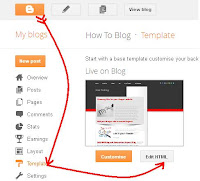
5.Go to Template and than Select Edit HTML and proceed.
6. Search for this below code by pressing Ctrl+F.(Check expand widgets templates)
7. Just below these lines Paste the code copied from below.
8. Replace "Your converted Adsense Code" with your adsense code you have just saved in step 3.
9. If you want to align it left, right or center just copy the below code and repeat step 8 and 9. Replace "float:left;"> with right or center(colored in red).
10. Select save template and you are done.
This is all for today. Will post some new tips and tricks in next post. If you face any problem just mention it in comments. If you like this article get subscribed to get daily updates in right in your inbox. Have a Nice Day.
Adding Adsense below Post Title
1. Go to your Adsense account and create and new ad unit in content menu.
2. Copy that code and paste in some text file.
3. Now go to Adsense Ads Converter and paste the adsense code and get new code. Copy that code and save it in text file.
4.Now go to your Blogger account and Select your blog.
5.Go to Template and than Select Edit HTML and proceed.
7. Just below these lines Paste the code copied from below.
8. Replace "Your converted Adsense Code" with your adsense code you have just saved in step 3.
9. If you want to align it left, right or center just copy the below code and repeat step 8 and 9. Replace "float:left;"> with right or center(colored in red).
10. Select save template and you are done.
This is all for today. Will post some new tips and tricks in next post. If you face any problem just mention it in comments. If you like this article get subscribed to get daily updates in right in your inbox. Have a Nice Day.
Saturday, February 18, 2012
Add Adsense Code in your Header
Number of peoples are trying hard to put adsense code in Header but failed. Today i come up with the same thing and its very easy. You will see by yourself and you can also practice it on your Blog. I will tell you step by step method.
Lets see how we do this...
Steps:-
(1):-Go to blogger.com
(3):-Press Ctrl+F and Search for this code :
(4):-Replace complete line with this:
or you can change it manually. I have describes it below.
(4):-Change || maxwidgets='1' to maxwidgets='2' || and look for these || preferred='yes' showaddelement='yes'> || . If they are no make them yes..
(5):-Now go to Layout and you will see "Add Widget " element above Header. You can now add adsense code to that place.
I hope you will like this Article and will leave your valuable feedback's. Get subscribed below to stay tuned of my posts.Have a nice Day..

